How to conduct a kohoot game in classroom?
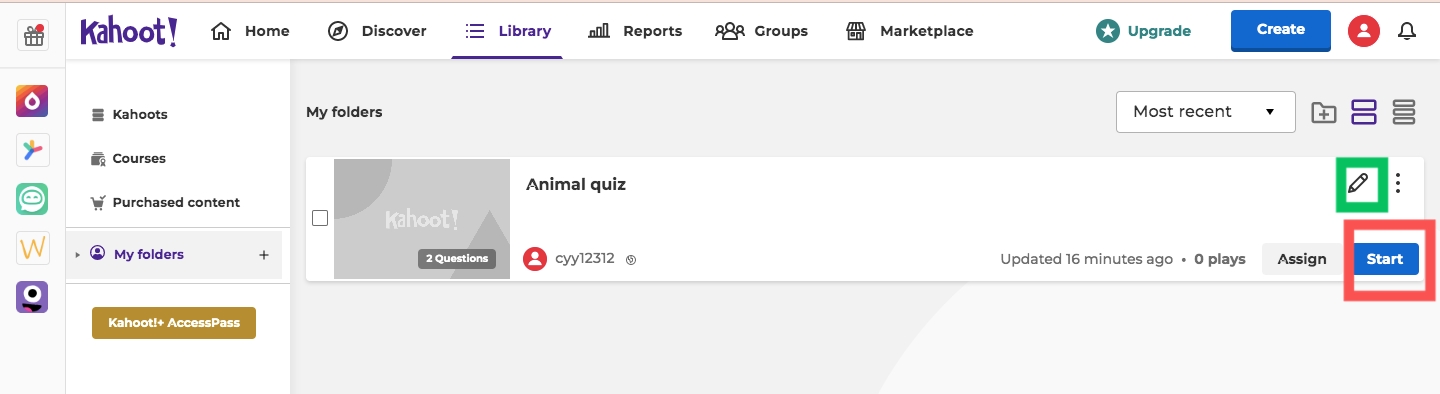
Hello, everyone! Your lovely BP is back! 👻👻 Last week, I displayed how to design a quiz through Kahoot as a teacher and have received positive response from you. Thank you guys! As promised, this blog will introduce how to conduct an interactive lesson by hosting the quiz live with students. Step 1 Go to your Kahoot library and click on the quiz to get started. Btw, you can also edit your quiz in case of any problems by clicking on the pencil sign. Step 2 Choose one mode to begin To make an interesting class, Kahoot offers various kinds of activity modes. Choose teacher-mode if you worry about classroom order; or choose student-led modes to provide more autonomy. Here I take classic mode as an example. Step 3 Help your students to join the game Kahoot is user-friendly as it provides clear instructions for new users, but teachers are still responsible to guide students to enter the game. Since Kahoot is techonology-based, so a phone, an ipad or a laptop is of necessity to e...
